
Web這幾年最夯的主題之一就是Web Components [1][3]。透過它,我們能使用其他人開發好的Widgests來提高開發效率,不過風險是目前有些瀏覽器支援並不完全或必須手動開啟支援[6],而我相信不久後所有瀏覽器就會完全支援囉[2]!
今天,小弟想跟各位簡介如何使用Firefox OS的Gaia Team所開發的gaia components [4][5],來打造你的Web App。(註一、二)
Gaia Components主要用bower來管理相關套件[4],因此要先在自己的開發環境裝bower。
$ npm install bower
1
$ npm install bower
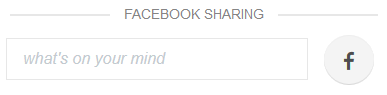
接著將以一個相當簡單的demo app為例,它使用gaia components來快速做出分享心得到FB的web app的外觀。透過bower安裝以下gaia components(註三)。
$ bower install gaia-components/gaia-theme
$ bower install gaia-components/gaia-component
$ bower install gaia-components/gaia-icons
$ bower install gaia-components/gaia-button
$ bower install gaia-components/gaia-text-input
$ bower install gaia-components/gaia-sub-header
123456
$ bower install gaia-components/gaia-theme$ bower install gaia-components/gaia-component$ bower install gaia-components/gaia-icons$ bower install gaia-components/gaia-button$ bower install gaia-components/gaia-text-input$ bower install gaia-components/gaia-sub-header
當成功安裝後,bower_components資料夾下將有已安裝的套件,以我的環境為例。
hermesc@hermesc-desktop:~/workspace/app-space/demo-gaia-components/bower_components$ ll
total 32
drwxrwxr-x 8 hermesc hermesc 4096 4月 17 13:31 ./
drwxrwxr-x 4 hermesc hermesc 4096 4月 17 13:31 ../
drwxrwxr-x 2 hermesc hermesc 4096 4月 17 13:31 gaia-button/
drwxrwxr-x 2 hermesc hermesc 4096 4月 17 13:31 gaia-component/
drwxrwxr-x 4 hermesc hermesc 4096 4月 17 13:31 gaia-icons/
drwxrwxr-x 2 hermesc hermesc 4096 4月 17 13:31 gaia-sub-header/
drwxrwxr-x 2 hermesc hermesc 4096 4月 17 13:31 gaia-text-input/
drwxrwxr-x 3 hermesc hermesc 4096 4月 17 13:31 gaia-theme/
12345678910
hermesc@hermesc-desktop:~/workspace/app-space/demo-gaia-components/bower_components$ lltotal 32drwxrwxr-x 8 hermesc hermesc 4096 4月 17 13:31 ./drwxrwxr-x 4 hermesc hermesc 4096 4月 17 13:31 ../drwxrwxr-x 2 hermesc hermesc 4096 4月 17 13:31 gaia-button/drwxrwxr-x 2 hermesc hermesc 4096 4月 17 13:31 gaia-component/drwxrwxr-x 4 hermesc hermesc 4096 4月 17 13:31 gaia-icons/drwxrwxr-x 2 hermesc hermesc 4096 4月 17 13:31 gaia-sub-header/drwxrwxr-x 2 hermesc hermesc 4096 4月 17 13:31 gaia-text-input/drwxrwxr-x 3 hermesc hermesc 4096 4月 17 13:31 gaia-theme/
接著只需透過習慣的<script> tag引用即可使用該gaia components。
我們在這app中先透過<gaia-sub-header>標示出這區塊是給user輸入要分享的內容。
<gaia-sub-header>Facebook sharing</gaia-sub-header>
1
<gaia-sub-header>Facebook sharing</gaia-sub-header>
接著使用[](https://developer.mozilla.org/en-US/Apps/Design/Firefox_OS_building_blocks/Input_area/2.3)與[](https://developer.mozilla.org/en-US/Apps/Design/Firefox_OS_building_blocks/Buttons/2.3)來快速建立輸入欄位與分享按鈕。
<gaia-text-input placeholder="what's on your mind" required></gaia-text-input>
<gaia-button circular><i data-icon="facebook"></i></gaia-button>
12
<gaia-text-input placeholder="what's on your mind" required></gaia-text-input><gaia-button circular><i data-icon="facebook"></i></gaia-button>
只需這樣,就能快速做出一個帶有Firefox OS風格的標題、輸入欄位與按鈕的web app, 並將時間專注於功能與邏輯上囉。
- 註一:Gaia Components目前只有部分封裝成Web Components,其他陸續開發中。
- 註二:Firefox OS在接下來幾個版本才會支援Web Components,因此開發而成的web app目前只能在支援的瀏覽器上執行。
[1] W3C introduction: http://www.w3.org/TR/components-intro/
[2] Current Status: http://www.w3.org/standards/techs/components#w3c_all
[3] https://developer.mozilla.org/en-US/docs/Web/Web_Components
[4] https://developer.mozilla.org/en-US/Apps/Design/Firefox_OS_building_blocks
[5] https://github.com/gaia-components
[6] https://developer.mozilla.org/en-US/docs/Web/Web_Components#Enabling_Web_Components_in_Firefox